
40% faster
load times
AOV Increase
+35%
QeApps is a Shopify App Solution provider dedicated to enhancing the functionality and user experience of Shopify stores with innovative applications. Our commitment to excellence and innovation drives us to create tools that empower online businesses to thrive in a competitive market.
Founded in 2019, QeApps was born out of the need to overcome the limitations that Shopify stores faced in adding new features. Recognizing the gap in the market, we embarked on a journey to develop solutions that would enable store owners to enhance their stores effortlessly.

Powerful tools designed to boost sales, increase engagement, and scale your Shopify store effortlessly.

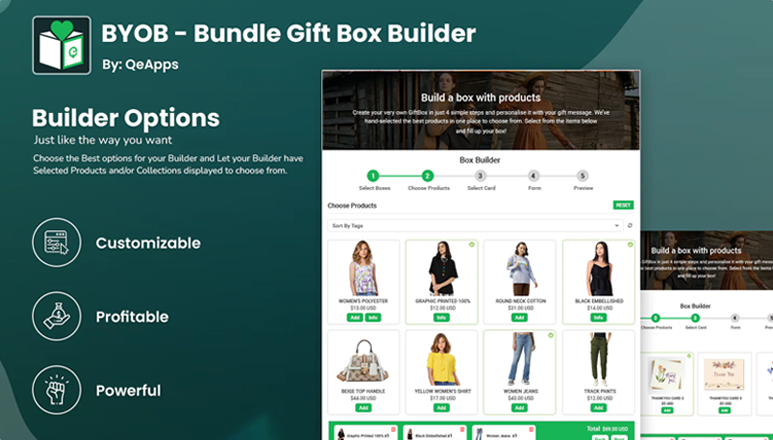
Let customers build custom product bundles that increase your AOV by 30%+. Drag-and-drop interface, flexible pricing, real-time updates.
Ship items to multiple addresses in one order, boosting convenience, sales & customer satisfaction.
Learn Moreload times
bundle orders
cart behavior
"QEAPPS helped us increase bundle sales by 45%. The support team is incredibly responsive and helpful."
US United States"Best Shopify apps we've used. The team went above and beyond to customize features for our store."
GB United Kingdom"Lightning fast, easy to set up, and our conversion rate jumped 28%. Highly recommend QEAPPS!"
DE Germany"Great app and helpful support team! They fixed all my issues in a short time. Very patient and helpful - absolutely we recommend them."
SG AustraliaBook a free consultation and our team will recommend the perfect QEAPPS solution for your store.
How do I get started with a QeApps app after installation?
After installing a QeApps app, open it from your Shopify Admin under Apps. Follow the in-app setup steps to configure basic settings and enable the app on your store. If you need assistance, our support team can guide you through the setup or configure the app for you.
Why is the app installed but not visible on my storefront?
In most cases, the app may require activation, placement, or theme embedding to appear on the storefront. Please ensure the app is enabled in your theme and that all required settings are saved. If the issue persists, contact our support team and we’ll quickly check and resolve it for you.
Do QeApps apps require any coding or technical expertise to use?
No. QeApps builds all their applications with a user-centric design, meaning stores can install, configure, and use the apps without coding experience. For merchants who prefer guided setup, the QeApps support team can assist with installation and customization. QE Apps
Can QeApps apps be customized to match my store’s branding?
Yes. Many QeApps tools such as Qe Recently Viewed, Qe Multiship, and PWA apps allow you to adjust their appearance and settings so they blend cohesively with your store’s look and feel. This helps maintain consistent branding and enhances the customer experience. QE Apps
What support does QeApps provide if I face issues during setup or usage?
QeApps offers comprehensive support from installation to advanced troubleshooting. You can contact their support team via email, live chat, or schedule a call for detailed walkthroughs and assistance tailored to your store’s unique needs.